
Terraform has emerged as the infrastructure as code (IAC) tool of choice for organizations due to its intuitive approach to infrastructure provisioning, declarative syntax, extensive provider ecosystem, and robust CI/CD integration.
In my previous note, we learned how to securely store secrets in AWS Secrets Manager using Terraform and GitHub Actions. But there’s a critical security gap I didn’t address: if you open the Terraform state file in Amazon S3, you’ll find your secrets in plain text.

Terraform creates AWS resources based on configuration files (.tf) and tracks their state in a .tfstate file. While this state file can be encrypted in S3, encryption only protects data at rest—anyone with S3 access can decrypt and read it. This means your secrets are one IAM permission away from exposure.
You can lock down AWS Secrets Manager with strict IAM policies, ensuring only authorized services access your secrets. But if those same secrets are stored in plain text in your Terraform state file, all that security is bypassed. Anyone with S3 bucket read access—developers, CI/CD pipelines, backup systems—can read your credentials directly from the state file.
The solution is straightforward: pass sensitive values directly to AWS resources without storing them in the state file. Earlier in 2025, Terraform released two features to address this security concern. These are the write_only property and support for ephemeral resources. You may read about these at — ephemeral resources and write_only property.
In this note, I will demonstrate how to use Terraform’s write_only attributes and ephemeral resources to eliminate sensitive values from the state file, building upon the AWS Secrets Manager implementation from my previous post.
Implementation
The implementation can be classified into four high-level steps. These are:
1. Create a sensitive credential
2. Store the sensitive credential using write-only attributes
3. Transfer secrets between services using ephemeral resources
4. Verify the statefile
If you want to follow along, check the code in my GitHub repository: kunduso/add-aws-secrets.
Step 1: Create a sensitive credential

The ephemeral keyword tells Terraform this resource is temporary. The password is generated with 24 characters, including special characters, but this value never gets written to the state file. This ephemeral password will be used in the next step to demonstrate write-only storage.
Step 2: Store the sensitive credential using write-only attributes

The secret_string_wo attribute is the key to eliminating secrets from the state file. Unlike the traditional secret_string attribute that stores the actual value in state, secret_string_wo (write-only) sends the value directly to AWS without persisting it locally.
Step 3: Transfer secrets between AWS services using ephemeral resources
This step demonstrates secure secret transfer between AWS services without exposing values in the state file. The process uses ephemeral resources to retrieve and pass secrets while maintaining write-only security.

This step has two distinct operations: retrieval and transfer. First, the ephemeral resource retrieves the secret from Secrets Manager without storing it in state. Second, the SSM parameter receives this value via value_wo, ensuring the secret never appears in the Terraform state file throughout the transfer process.
Step 4: Verify the statefile
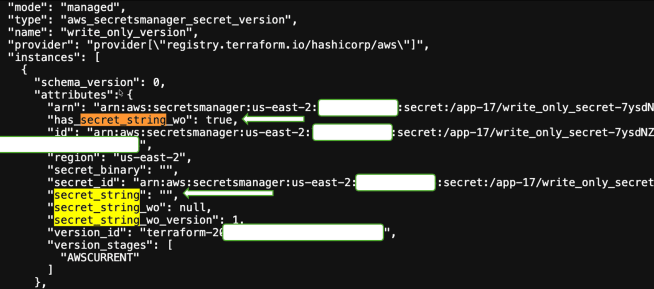
After deployment, examining the Terraform state reveals that sensitive values are absent while the resources function normally.
For the Secrets Manager secret version, notice the empty secret_string field and the crucial has_secret_string_wo: true property:
The SSM parameter shows the same pattern—empty value field with has_value_wo: true:
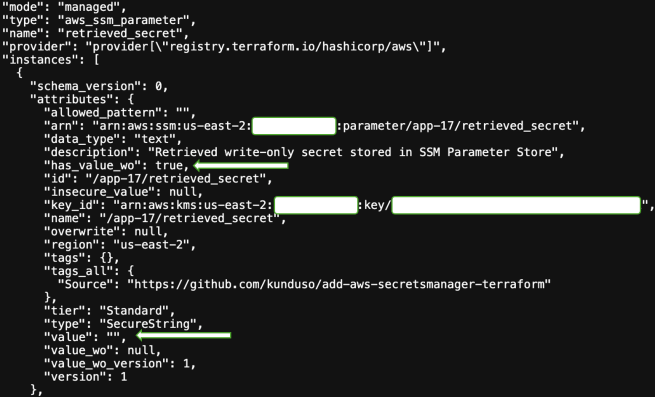
This is the security win. Your state file contains no sensitive data, yet both services store and serve the actual secret values when accessed through AWS APIs or the console.
Conclusion
Write-only attributes and ephemeral resources prevent sensitive data from being stored in Terraform state files while maintaining standard resource functionality. The state file shows empty values with has_secret_string_wo: true flags, while AWS services store and serve the actual secrets. This approach removes a significant security exposure without changing operational workflows. Cloud engineering teams can continue using existing Terraform processes while ensuring that state files contain no sensitive information accessible by anyone with Amazon S3 read or higher permissions.
Through this implementation, we learnt that minimal code changes—replacing secret_string with secret_string_wo and using ephemeral resources for temporary values—deliver immediate security benefits that are verifiable through state file inspection.
If your team manages Terraform workloads with sensitive credentials, audit your current state files for exposed secrets and prioritize migrating to write_only attributes. The implementation is straightforward, the security impact is measurable, and the risk of continuing with plain-text secrets in state files is unnecessary.

 My Devops Journal
One thought on “Eliminate sensitive values from Terraform state using write-only attributes”